
MTK (MediaTek) FRP Unlock/Bypass/Remove/Reset Tool Latest Version Free Download:
Do you have an MTK based smartphone, and want to get rid of the FRP
lock of the phone, haunting you down, and do not know how to get it
unlocked? Though, the FRP lock of the phone was developed to provide
safety to the data after getting the phone lost. But, more than often,
this lock hurdle you in getting the factory data to reset.
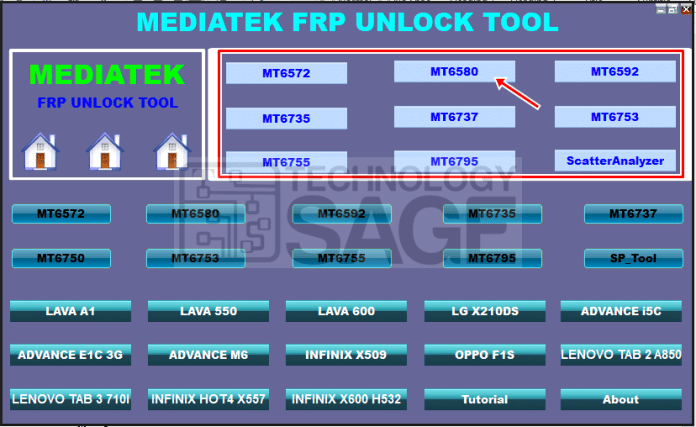
And you have to visit the service providers, to unlock the FRP lock.
But, now, you can have the tool, MTK FRP Unlock Tool. By using the tool
you can remove the FRP lock, with just a couple of clicks.
Download MTK FRP Unlock Tool from the given download link, and install it on your Windows computer.
What is FRP lock?
FRP lock was introduced the very first time on Android Lollipop 5.0,
and this term FRP lock is very popular nowadays, as most of the
smartphones now are of Android 5.0 and higher version.
The lock helps the user, in this case, if the phone gets lost. If FRP
locks are enabled, and the user wants to restore the phone with the
default settings, this FRP lock demands the most recent use of the
Google account.
In this case, you will have to provide the latest Google account details and password.
Otherwise, you will get the action completed. Indirectly, the feature
was developed to help the users, but unfortunately, this can be
bypassed.
With just a simple tool, what I have mentioned here, you can bypass
any FRP lock of the MTK based smartphone. Beware, the tool is only
specific to MTK phones, and any other phone may not be entertained by
the facility.
How to use MTK FRP Unlock Tool?
The use of this tool is pretty simple, just follow what I am going to mention here.
First, you need to download MTK FRP Unlock Tool on your computer; this software can only be installed on a Windows computers.
Second, you need to have the proper USB driver set up on your
computer, as without the proper drivers, the MTK smartphone may not be
recognized, thus you will not unlock the FRP lock.
And now, if you have installed the tool, pick a USB data cable, and
connect one side of the data cable with the MTK based smartphone, and
the other side with the computer.
And tap on the FRP lock option
It will provide you the option to unlock the phone or bypass the FRP lock of the phone.
Remember, the tool got other features like removing the phone’s lock,
Pattern lock, or Pin lock. And, if you got any of the mentioned issues
to get the right use of the tool thereby
Features of MTK FRP Unlock Tool:
- FRP unlock tool can help you in removing the factory reset
protection lock on your MTK based CPU phone. Get the arrangements what I
have narrated, and follow the instructions. - Get the phone unlocked with a couple of clicks
- Can help you in removing the FRP lock of MTK based phones.
- Simple and clean interface
- Can also help you in removing the Pattern lock, SIM lock, or PIN lock